
A practical guide on how to properly structure your disavow.txt file for Google — and the moment you realize that it’s not enough. Learn when it’s time to bring…
A step-by-step guide: when to use disavow.txt, why it often “doesn’t work” alone, and how to stop botnets and link farms on a network level using MikroTik firewall, address-lists and drop rules.
⚠ This guide is for website owners, SEO specialists, and system administrators. We’ll show a combined approach: first we neutralize signals to Google using disavow.txt, and when that's not enough – we activate the MikroTik firewall and block traffic directly.
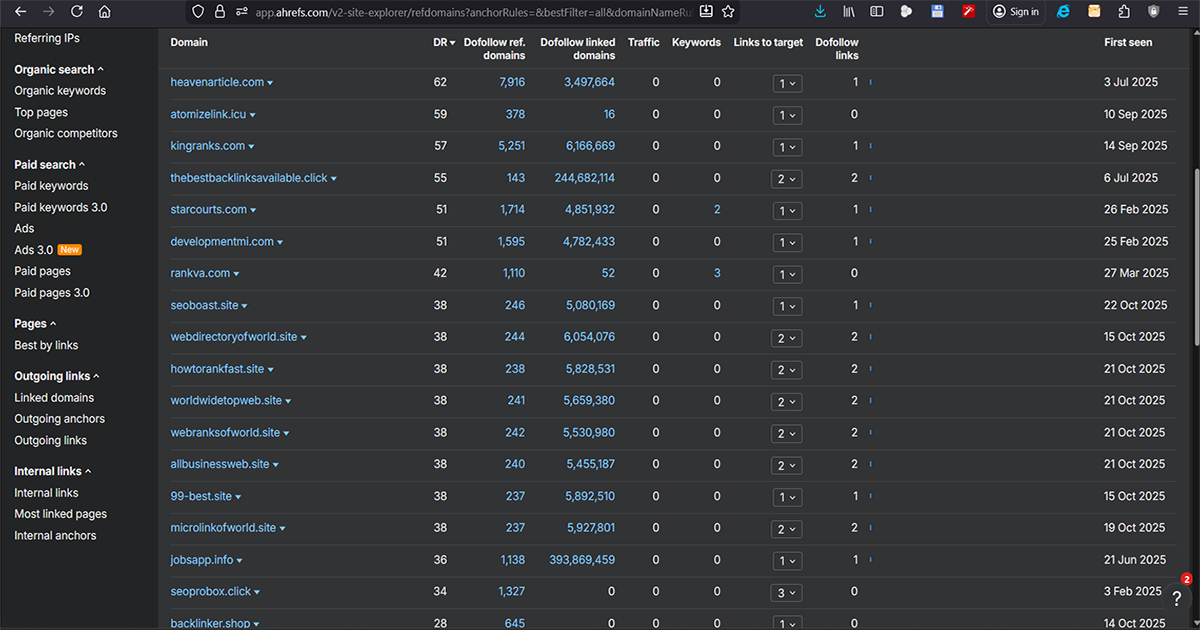
The classic SEO approach: you upload a disavow.txt file to Google and wait. In 2025, this is often not enough – Google claims it "automatically ignores" bad links, but link farms and botnet scrapers still hit your site, load your server, and pollute your logs. That’s why we add a second layer: the MikroTik firewall – to block IP ranges and networks completely.
disavow.txt is a text file you upload to Google Search Console → Disavow links for a specific domain.
Through it, you’re asking Google to ignore certain links or domains when analyzing your site.
disavow.txt as domain:example.com.Important: Disavow is a request to Google, not a command. There is no guarantee for immediate or any results.
It’s best to disavow entire domains instead of individual URLs.
# Disavow file for example.com
# List of link farms, directories, and SEO spam domains
# Upload to Google Search Console → Disavow links

domain:thebestbacklinksavailable.click
domain:webdirectoryofworld.site
domain:microlinkofworld.site
domain:webranksofworld.site
domain:allbusinessweb.site
domain:rankvanceauthority.info
domain:rankpilot.shop
domain:backlinker.shop
domain:seoprobox.click
domain:kompromat100.info
domain:dghub.ru
domain:agmermer.pro
Tip: keep your disavow.txt under version control (Git) with comments – useful for future revisions.
Even if you submit a disavow.txt file, SEO botnets may continue to scrape URLs, steal content, or send HEAD/GET requests.
If you don’t care about the link, why care about the traffic from the same network? That’s where MikroTik comes in.
Based on WHOIS lookup of IPs in the logs (e.g. 185.209.59.146), you find they belong to subnet: 185.209.56.0/22.
# Create address-list for SEO spam
/ip firewall address-list
add list=seo_spam address=185.209.56.0/22 comment="LLC DataNet ISP - link farm"
add list=seo_spam address=5.181.217.0/24 comment="SEO farm subnet"
add list=seo_spam address=46.243.43.0/24 comment="Backlink checker bot"
add list=seo_spam address=45.84.179.0/24 comment="Low-quality SEO hosting"# Drop inbound traffic from SEO spam networks to MikroTik
/ip firewall filter add chain=input src-address-list=seo_spam action=drop comment="Drop SEO spam (input)"
# Drop traffic passing through to the web server
/ip firewall filter add chain=forward src-address-list=seo_spam action=drop comment="Drop SEO farm traffic (forward)"Situation:
- Logs show persistent HEAD/GET requests from 185.209.59.146
- WHOIS reveals network 185.209.56.0/22 with a suspicious ISP
- Disavow.txt uploaded, but traffic persists
Solution:
1) Add 185.209.56.0/22 to address-list=seo_spam
2) Add firewall drop rules
3) Counters on rules start increasing immediately
4) Logs clean up; server load decreases
Result:
- Disavow stays in place for Google
- MikroTik blocks bots before they reach the server| Approach | Pros | Cons | When? |
|---|---|---|---|
| Disavow.txt | Official Google tool, cleans SEO signals | Does not block traffic; no guaranteed outcome | For toxic backlinks and penalty prevention |
| MikroTik Firewall | Instantly blocks bot traffic; reduces server load | Requires router access and networking knowledge | When link farms keep hitting your site |
| Combination | Best option: Google ignores the links, MikroTik blocks the bots | More work | Serious projects with heavy traffic and lots of spam links |
Email us at office@ntg.bg
or request a free consultation.
Tip: keep track of all changes (what you disavowed, which subnets you blocked) in Git or a README – will save you lots of time later.