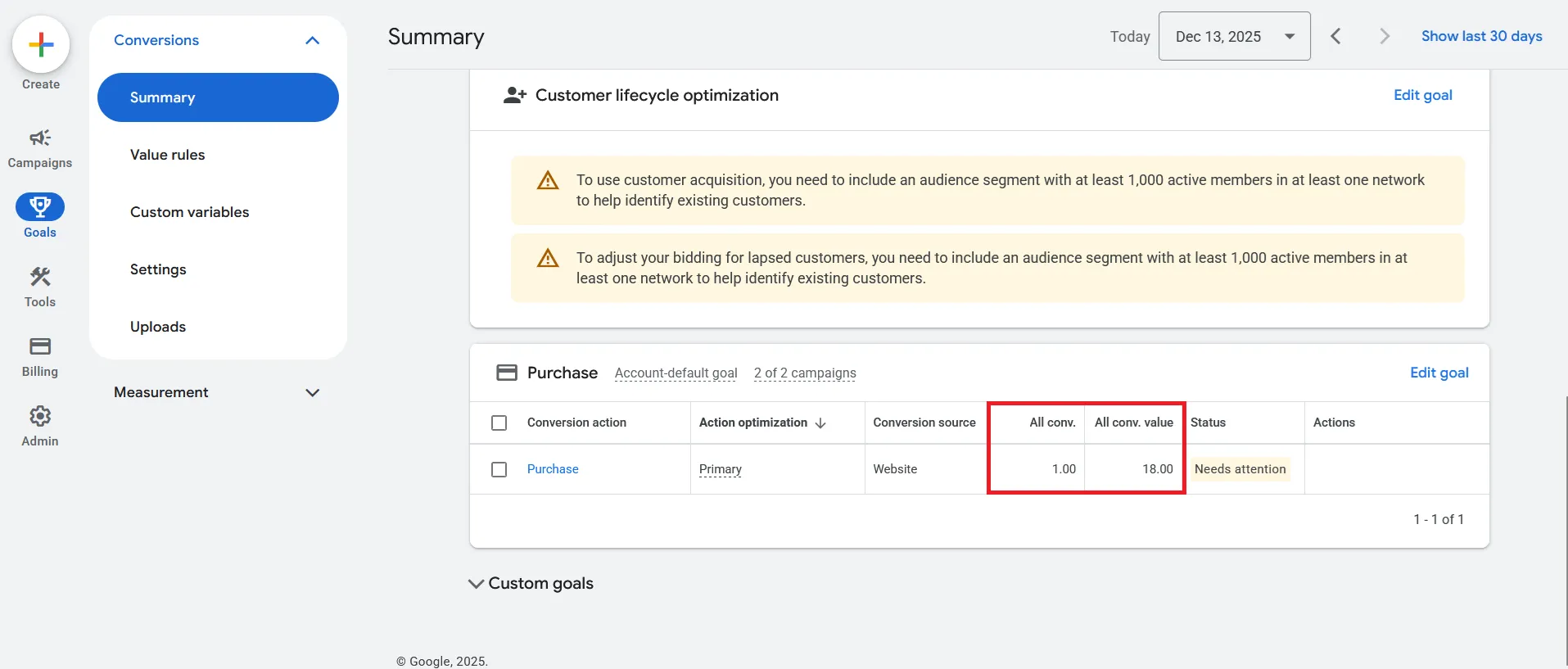
It is very common for the number of purchases in Google Analytics (GA4) and Google Ads not to match.
This is not a mistake — it’s normal, because the two tools have different roles and use
different reporting and attribution logic. Below we explain why — and how to have full transparency.
Important for business owners: discrepancies are not a “blank space” for interpretations.
With proper setup and clear rules, there is no room for subjective narratives or “convenient” reports —
you can see exactly what was recorded, by which rules, and where it comes from.
What is a conversion and why GA4 and Google Ads show different results
Short and clear: GA4 shows all purchases, while Ads shows the purchases that are attributed
to ads based on predefined rules (attribution model, conversion window, available measurement signals, etc.).
🎯
What “conversion” means
A conversion is an action a user takes that the business considers valuable.
In online stores, that is a completed order (Purchase).
The key is where it is counted — in GA4 or in Google Ads.
GA4
Google Analytics (GA4): the real picture
GA4 records all real purchases, regardless of source:
organic search, direct, Facebook/Instagram, email, referral, Google Ads, etc.
In other words: GA4 is your baseline for real sales and real revenue.
Ads
Google Ads: the effect of advertising
Google Ads records as conversions only the purchases attributed to Google ads —
according to the conversion window, attribution model, and available signals.
Important: Ads doesn’t answer “how many total orders you have,” but “what impact ads have.”
Key nuances (why the numbers won’t become 1:1)
Completely normal
1) Ads doesn’t always require gclid
Even without gclid, a conversion may still be recorded if you use:
Enhanced Conversions, import from GA4, server-side tagging,
and with Consent Mode v2, modelled conversions are also possible.
gclid ≠ the only mechanism.
2) The attribution model matters a lot
GA4 and Ads may use different attribution models (e.g., data-driven vs last click).
The same purchase may be counted in GA4, not counted in Ads, or reported with a different value —
that’s not an error, but different attribution logic.
3) Time lag & cross-device
The path to purchase is often long (days) and spans more than one device.
GA4 often captures more context on longer journeys, while Ads can sometimes lose signals,
model data, or round results. That’s why a 1:1 match is rare.
Professional conclusion: discrepancies between GA4 and Google Ads are normal and expected,
because the tools have different roles, different attribution, and different reporting logic.
GA4 shows business reality; Ads shows advertising influence based on predefined rules.
And that’s exactly why the right approach is transparency and rules — not “stories” and not convenient interpretations.
🔍
What you get in the check (15–20 min.)
Cross-checking the data: GA4 ↔ Google Ads ↔ store/platform (Purchase, value, currency, duplication).
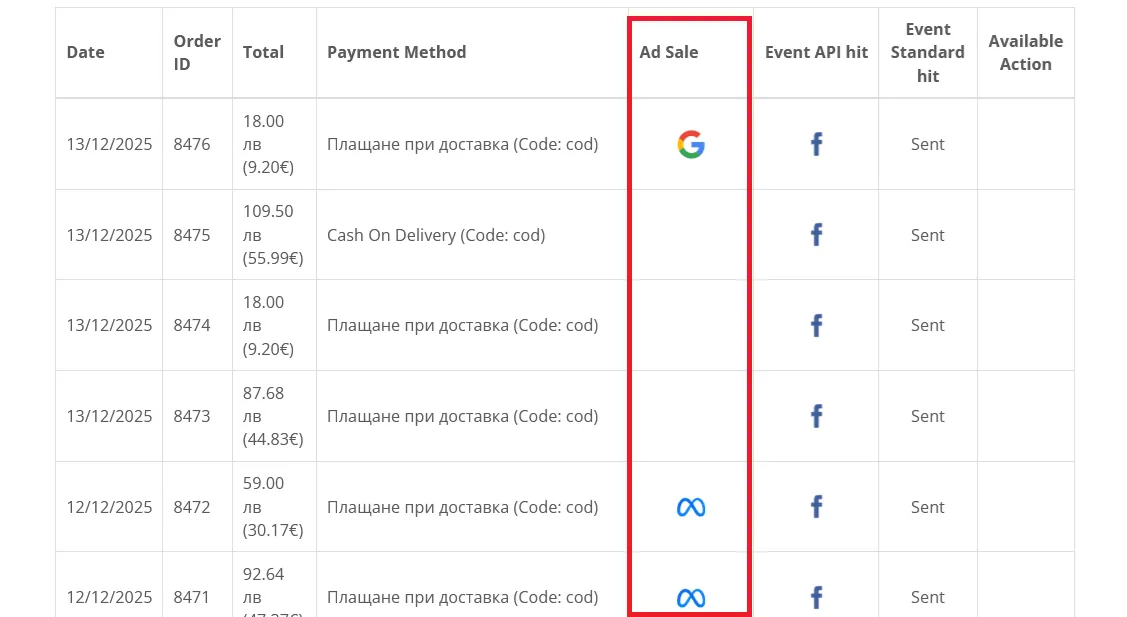
In the system you can see orders with clear attribution
All real conversions recorded in the system.
This is where the platform’s real value becomes visible.
Every order is clearly marked which ad it came from.
Full transparency — one set of rules for everyone and clear attribution for each order.
Result: no room for “convenient interpretations” — you see what was recorded under one consistent methodology.
⚠️
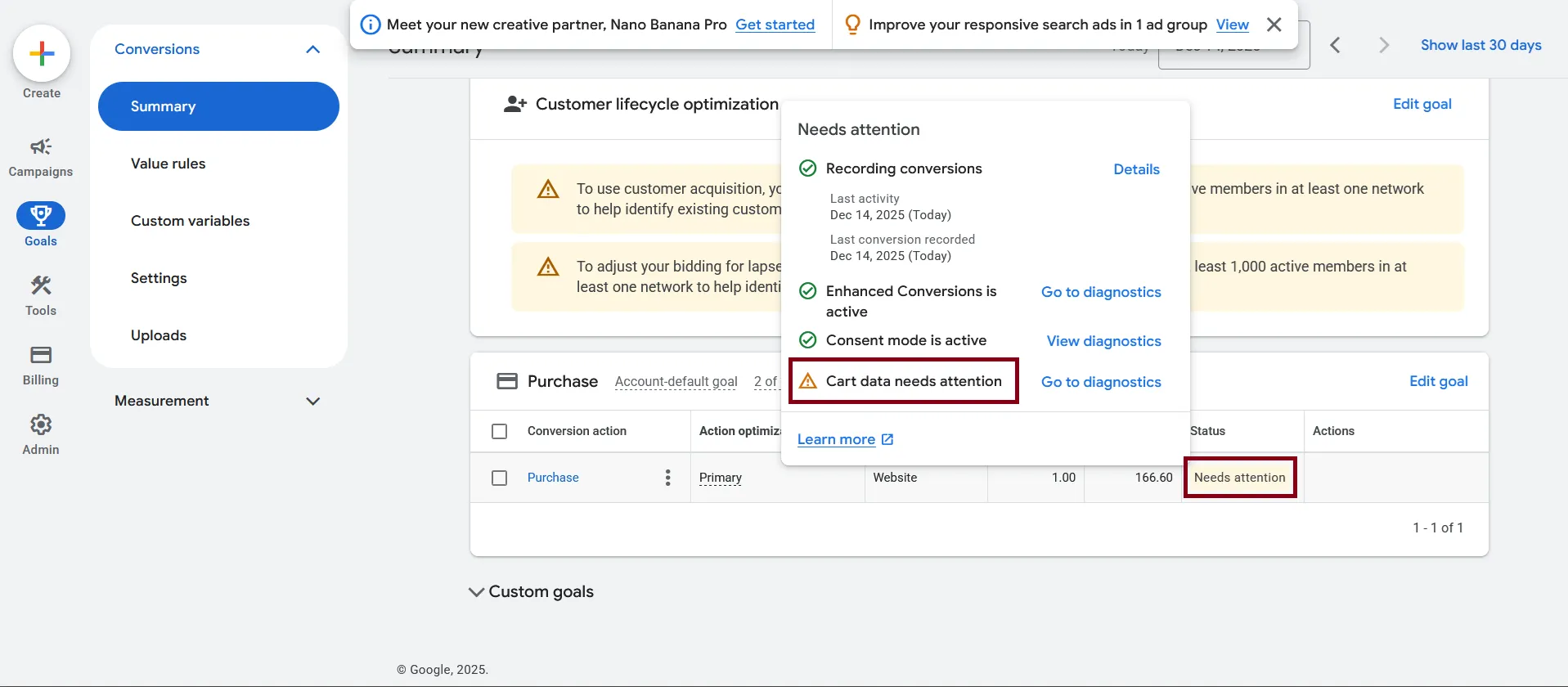
“Needs attention” in Google Ads – what it actually means
If you see “Needs attention” next to conversions in Google Ads, there’s no need to worry.
This does not mean “there are no sales”.
Most commonly it means Ads expects better eCommerce signal quality
(for example product data, value, currency, checkout events), to optimize more accurately.
✅ Recording conversions
If it says “Recording conversions” and there is “Last conversion recorded” — conversions are being logged.
✅ Enhanced Conversions active
This improves attribution (especially with consent limitations) and helps Ads connect purchases to ads more reliably.
✅ Consent mode active
Modelled conversions are possible. This is another reason Ads and GA4 won’t be 1:1.
⚠️ Cart data needs attention
This is a warning about incomplete/missing eCommerce data (items, add_to_cart, begin_checkout, etc.).
Ads is essentially saying: “A better signal is needed for optimization.”
Important: this does not mean “sales are missing”.
Business takeaway: when rules are clear and transparency is in place, such messages can’t be used as “smoke”.
You can see whether there are conversions, when they were recorded, and what exactly is missing as a signal — no “versions” and no subjective interpretations.
If the warning is about incomplete eCommerce events/checkout: OpenCart services.
(Screenshot) Google Ads → Conversions → “Needs attention”.
Frequently asked questions
Short answers, no fluff
For real sales and revenue — GA4. For the impact/ROI of ads — Google Ads.
They answer different questions, so they won’t match 1:1.
Realistically — not perfectly. But you can get closer with the right setup:
tagging, consent mode, Enhanced Conversions, server-side, and a clear comparison methodology.
Most commonly: access to GA4 and Google Ads (read-only is absolutely sufficient), plus information about the store/checkout.
We can also do it via screen share, if you prefer.
✅
Final takeaway
Discrepancies between GA4 and Google Ads are normal and expected, because the two tools have different roles,
different attribution, and different reporting logic.
GA4 shows the full business reality, while Google Ads shows the impact of advertising based on predefined rules.
GA4 = all real purchases (your business baseline)
Google Ads = purchases from Google ads (advertising impact)
Full transparency = you know exactly what’s happening and why, under clear rules
Result: reports are verifiable and consistent — no “convenient versions” and no subjective interpretations.