
How to segment your network with VLANs on MikroTik when the device is behind a main router. Practical steps for VLAN10/20/30, WiFi, DHCP and firewall.
⚠ This guide is for offices where the MikroTik is not the main router,
but an internal “smart router” behind the main gateway. In this example, the MikroTik has
address 10.0.0.100/24 on ether1, and the main router is 10.0.0.1.
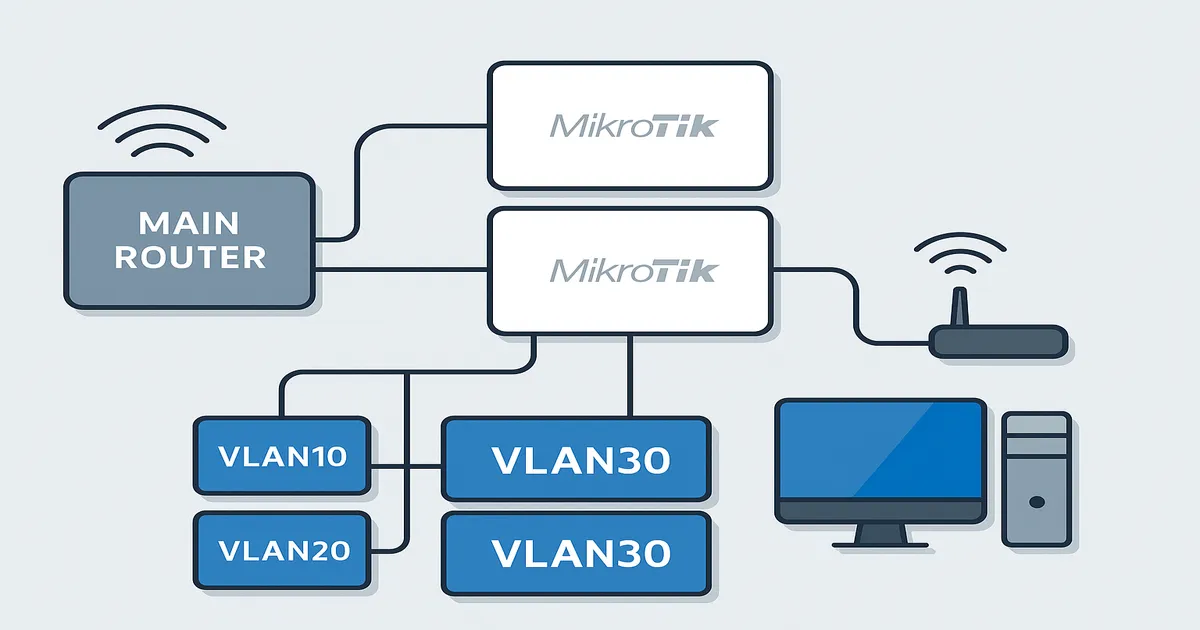
The goal is simple: a small MikroTik behind a main router should manage several fully isolated networks – Guest WiFi, video/streaming and the main LAN. We show everything step by step, with commands you can copy/paste directly.
Main router (ISP / core): 10.0.0.1/24
MikroTik RB941 (internal router): 10.0.0.100/24 on ether1
MikroTik controls:
- VLAN10 → 192.168.40.0/24  (Guest / WiFi guests)
- VLAN20 → 192.168.20.0/24  (Video / IPTV / streaming)
- VLAN30 → 192.168.30.0/24  (LAN / main devices)
- WireGuard → 172.14.1.0/28 to 192.168.10.0/24 and 192.168.88.0/24
Here the MikroTik is behind a main router, but it takes over all network segmentation, DHCP and firewall logic.
We create one bridge with VLAN filtering enabled, and three VLAN interfaces on top of it:
/interface bridge
add arp=proxy-arp name=bridge1 vlan-filtering=yes

/interface vlan
add interface=bridge1 name=vlan10 vlan-id=10
add interface=bridge1 name=vlan20 vlan-id=20
add interface=bridge1 name=vlan30 vlan-id=30Ether2/3/4 and virtual WiFi interfaces join the bridge with PVID according to the VLAN they should belong to:
/interface bridge port
add bridge=bridge1 interface=ether2 pvid=10  comment="Guest / VLAN10"
add bridge=bridge1 interface=ether3 pvid=20  comment="Video / VLAN20"
add bridge=bridge1 interface=ether4 pvid=30  comment="LAN / VLAN30"
add bridge=bridge1 interface=wlan-lan pvid=10
add bridge=bridge1 interface=wlan2    pvid=20
add bridge=bridge1 interface=wlan3    pvid=30
add bridge=bridge1 interface=wlan1 comment=defconf
add bridge=bridge1 interface=ether1 comment="WAN to 10.0.0.0/24"Bridge1 acts as a trunk (tagged), and device ports are untagged:
/interface bridge vlan
add bridge=bridge1 vlan-ids=10 tagged=bridge1 untagged=wlan-lan,ether2
add bridge=bridge1 vlan-ids=20 tagged=bridge1 untagged=wlan2,ether3
add bridge=bridge1 vlan-ids=30 tagged=bridge1 untagged=wlan3,ether4
If you later connect a managed switch, just add its port to the tagged= list for the required VLANs.
We have main wlan1 and three virtual APs – one for each segment:
/interface wireless security-profiles
set [ find default=yes ] supplicant-identity=MikroTik
add authentication-types=wpa-psk,wpa2-psk mode=dynamic-keys name=wifi-video
add authentication-types=wpa-psk,wpa2-psk mode=dynamic-keys name=wifi-lan
add authentication-types=wpa-psk,wpa2-psk mode=dynamic-keys name=guest

/interface wireless
set [ find default-name=wlan1 ] band=2ghz-b/g/n channel-width=20/40mhz-XX disabled=no distance=indoors frequency=auto mode=ap-bridge ssid=MikroTik-2BCD25 wireless-protocol=802.11

add disabled=no master-interface=wlan1 name=wlan-lan security-profile=wifi-lan ssid=wlan-lan wps-mode=disabled
add disabled=no master-interface=wlan1 name=wlan2 security-profile=wifi-video ssid=wlan-video wps-mode=disabled
add disabled=no master-interface=wlan1 name=wlan3 security-profile=guest ssid=wlan-guest wps-mode=disabledEach VLAN gets its own gateway and DHCP pool:
/ip address
add address=192.168.40.1/24 interface=vlan10 network=192.168.40.0
add address=192.168.20.1/24 interface=vlan20 network=192.168.20.0
add address=192.168.30.1/24 interface=vlan30 network=192.168.30.0
add address=10.0.0.100/24   interface=ether1 network=10.0.0.0

/ip pool
add name=pool10 ranges=192.168.40.10-192.168.40.100
add name=pool20 ranges=192.168.20.10-192.168.20.100
add name=pool30 ranges=192.168.30.10-192.168.30.100

/ip dhcp-server
add address-pool=pool10 interface=vlan10 name=dhcp10
add address-pool=pool20 interface=vlan20 name=dhcp20
add address-pool=pool30 interface=vlan30 name=dhcp30

/ip dhcp-server network
add address=192.168.40.0/24 gateway=192.168.40.1
add address=192.168.20.0/24 gateway=192.168.20.1
add address=192.168.30.0/24 gateway=192.168.30.1

/ip dns
set allow-remote-requests=yes servers=10.0.0.1

/ip dns static
add address=10.0.0.100 name=router.lan type=A comment=defconfBase rules + separate chains for VLAN10/20/30:
/ip firewall address-list
add address=198.51.100.10    list=allowed_to_router
add address=192.168.10.0/24 list=allowed_to_router
add address=172.14.1.2      list=allowed_to_router
add address=192.168.40.0/24 list=allowed_to_router
add address=198.51.100.20    list=allowed_to_router

/ip firewall filter
add action=fasttrack-connection chain=forward connection-state=established,related hw-offload=yes

# Winbox only from trusted IPs and internal networks
add chain=input action=accept protocol=tcp dst-port=8291 src-address-list=allowed_to_router comment="Allow Winbox on WAN from allowed IPs"
add chain=input action=accept protocol=tcp dst-port=8291 src-address=192.168.40.0/24
add chain=input action=accept protocol=tcp dst-port=8291 src-address=192.168.20.0/24
add chain=input action=accept protocol=tcp dst-port=8291 src-address=192.168.30.0/24

# ICMP, loopback, WireGuard to the router
add chain=input action=accept protocol=icmp comment="defconf: accept ICMP"
add chain=input action=accept dst-address=127.0.0.1 comment="defconf: accept to local loopback (for CAPsMAN)"
add chain=input action=accept protocol=udp dst-port=13231
add chain=input action=accept in-interface=wireguard1

# IPsec traffic (default)
add chain=forward action=accept ipsec-policy=in,ipsec comment="defconf: accept in ipsec policy"
add chain=forward action=accept ipsec-policy=out,ipsec comment="defconf: accept out ipsec policy"

# Established / related / untracked
add chain=forward action=accept connection-state=established,related,untracked

# Drop Winbox from other IPs on WAN
add chain=input action=drop protocol=tcp dst-port=8291 in-interface-list=WAN comment="Block Winbox on WAN from others"

# Drop invalid + drop everything to the router not from LAN
add chain=input   action=drop connection-state=invalid comment="defconf: drop invalid"
add chain=forward action=drop connection-state=invalid comment="defconf: drop invalid forward"
add chain=input   action=drop in-interface-list=!LAN comment="defconf: drop all not coming from LAN"
Segmentation between VLANs via jump to separate chains:
/ip firewall filter
# Jump to per-VLAN chains
add chain=forward in-interface=vlan10 action=jump jump-target=vlan10-chain
add chain=forward in-interface=vlan20 action=jump jump-target=vlan20-chain
add chain=forward in-interface=vlan30 action=jump jump-target=vlan30-chain

# VLAN10 – Guest → Internet only
add chain=vlan10-chain action=accept out-interface-list=WAN comment="Guest > Internet"
add chain=vlan10-chain action=drop dst-address=192.168.20.0/24 comment="Guest > Video"
add chain=vlan10-chain action=drop dst-address=192.168.30.0/24 comment="Guest > LAN"

# VLAN20 – Video → Internet only
add chain=vlan20-chain action=accept out-interface-list=WAN comment="Video > Internet"
add chain=vlan20-chain action=drop dst-address=192.168.40.0/24 comment="Video > Guest"
add chain=vlan20-chain action=drop dst-address=192.168.30.0/24 comment="Video > LAN"

# VLAN30 – LAN → Internet, but no Guest/Video
add chain=vlan30-chain action=accept out-interface-list=WAN comment="LAN > Internet"
add chain=vlan30-chain action=drop dst-address=192.168.40.0/24 comment="LAN > Guest"
add chain=vlan30-chain action=drop dst-address=192.168.20.0/24 comment="LAN > Video"

# Drop new WAN traffic that is not dst-nated
add chain=forward action=drop connection-state=new connection-nat-state=!dstnat in-interface-list=WAN comment="defconf: drop all from WAN not DSTNATed"We use accept rules for traffic through the tunnel, and a single masquerade towards WAN:
/ip firewall nat
# No NAT for traffic to 10.0.0.0/24 over the tunnel
add action=accept chain=srcnat src-address=172.14.1.0/28 dst-address=10.0.0.0/24
add action=accept chain=srcnat src-address=192.168.10.0/24 dst-address=10.0.0.0/24

# Main masquerade towards the main router
add action=masquerade chain=srcnat out-interface-list=WAN comment="NAT to main router"The real WireGuard part of the config looks like this:
/interface wireguard
add listen-port=13231 mtu=1420 name=wireguard1

/ip address
add address=172.14.1.5/28 interface=wireguard1 network=172.14.1.0

/interface wireguard peers
add interface=wireguard1 name=Sofia endpoint-address=203.0.113.10 endpoint-port=13231 public-key="xxxxxxxxxxxgvo0SKzchG/9GXZZgizyncj9I4TY=" allowed-address=192.168.10.0/24,172.14.1.2/32,10.0.0.0/24,10.0.0.100/24 persistent-keepalive=25s
add interface=wireguard1 name="Sofia Maze" endpoint-address=203.0.113.20 endpoint-port=13231 public-key="xxxxxxxxxxxxx+K6FWt3Fp7Pm69BJ1J6uHISCLSRSg=" allowed-address=192.168.88.0/24,172.14.1.1/32,10.0.0.0/24,10.0.0.100/24 persistent-keepalive=25s

/ip route
add dst-address=192.168.10.0/24 gateway=172.14.1.2
add dst-address=192.168.88.0/24 gateway=172.14.1.1/queue simple
add comment="Limit guest internet to 3Mbps up/down" name=guest-speed target=192.168.40.0/24 max-limit=3M/3M
/snmp
set contact=admin@nsc-bg.com enabled=yes
/system clock
set time-zone-name=Europe/Sofia
/tool mac-server
set allowed-interface-list=LAN
/tool mac-server mac-winbox
set allowed-interface-list=LANEmail us at office@ntg.bg or request a free consultation.

Head of IT Infrastructure & Security at Network Technology.