
You have a firewall, fail2ban and monitoring, yet an attack can still get through. How to connect servers, router and monitoring so they block together and send…
Why separate protections are not enough, and what protection looks like when the servers, the router and the monitoring know about each other.
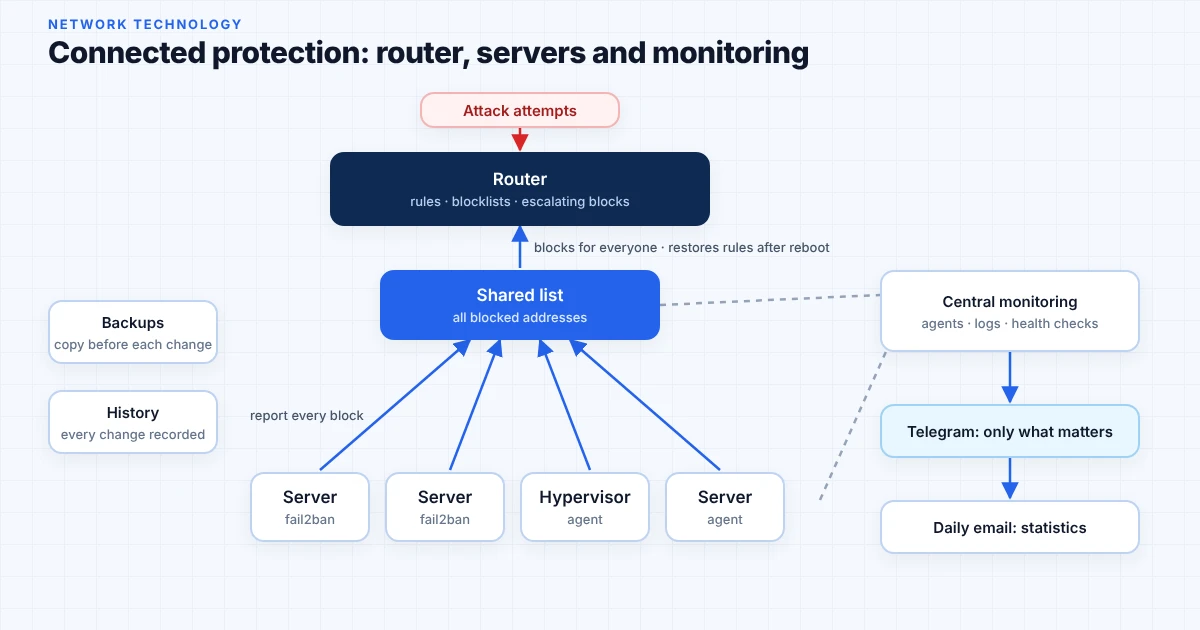
In most small companies the security setup looks fine. The router has rules, the servers run fail2ban, and there is some kind of monitoring.
The problem is that these pieces don't know about each other. Monitoring sees the attack in the logs of one server. The router, which could stop it for every machine, never hears about it. The attacker simply moves on to the next server.
Protection that has stopped working looks exactly like protection that has nothing to report. The agent crashed after an update, the service didn't start after a reboot, the log disk is full.
For days there are no alerts and everyone assumes all is well. In reality nothing is being watched.
This isn't the admin's fault. It is what happens when every tool is added separately, at different times, for a different problem. Each one does its job, but nobody looks at the whole picture.
Usually there is a firewall and log-based blocking. What's missing is the connection between them. If you recognise at least two of these, this article is for you:
Each of these looks minor on its own. Together they mean that during an attack everything depends on someone happening to look at the right log. And when something breaks, nobody remembers what was changed and when.
This isn't a new product. It uses the familiar tools, connected to each other. Piece by piece:
Stops the attack before it reaches the servers. Obviously invalid traffic is dropped right at the entrance. An address that keeps trying is blocked first for a short time, then longer, and finally for good.
Each server reads its own logs and blocks on its own. The rules are tuned for the services that actually run there, not left at the defaults. On its own, though, fail2ban only protects its own server: a blocked address keeps trying on the next one.
Every server records every block in one place, so you can see which address tried where. The router restores its rules from this list after a power cut or reboot, without anyone re-entering them.
Agents on every machine, including the hypervisors, plus the router logs, collected in one place. Ten failed logins on one server are nothing unusual. The same ten spread across five servers in a minute are an attack no single server can see.
When it is clear that it’s an attack, the address is blocked automatically through the same shared list and router. No separate new tool is added. Unclear cases are not blocked but sent to a person.
The servers check each other: are the agents running, are the logs arriving. If something stops, that is treated as a problem and reported right away.
Alerts come at two levels. Telegram only gets what the system did not stop on its own and needs a person. Everything else arrives once a day by email, grouped and counted.
An attack that was stopped automatically is not a reason for a Telegram alert. It shows the protection is working, and you see it in the daily email.
Before every change the settings are backed up. Virtual machines get snapshots, and backups are kept somewhere else, not on the same server. A wrong rule on the router can cut off access for everyone, so every such change comes with a ready way back.
Every settings change is recorded: what, when and why. The record is regularly compared with the real state. If someone changed something by hand and didn’t record it, it shows up.
The most common worry is that the protection will block your own staff or stop a service during working hours. That's why it is done in steps:
This way everything is introduced in parts, without interrupting services. Your team sees each step before it starts acting and can stop it. If something doesn't behave as expected, rolling back takes minutes.
If you recognised your own setup at the start of this article, begin with a review: what you have, what isn't connected and what's missing. Afterwards you'll know what needs to be done, whether or not we work together.

Head of IT Infrastructure & Security at Network Technology.