
A camera, a TV, guests and a work laptop on one network can all see each other. How to split the network at home and in the office without replacing any device.
Network segmentation at home and in the office: a guest network, a separate network for cameras and office network protection.
Most network problems do not come from hackers. They come from a setup nobody maintains.
The network is set up once, when the router is installed. Then devices are added, people change, machines are removed. The settings stay the same. Here are two cases we see often.
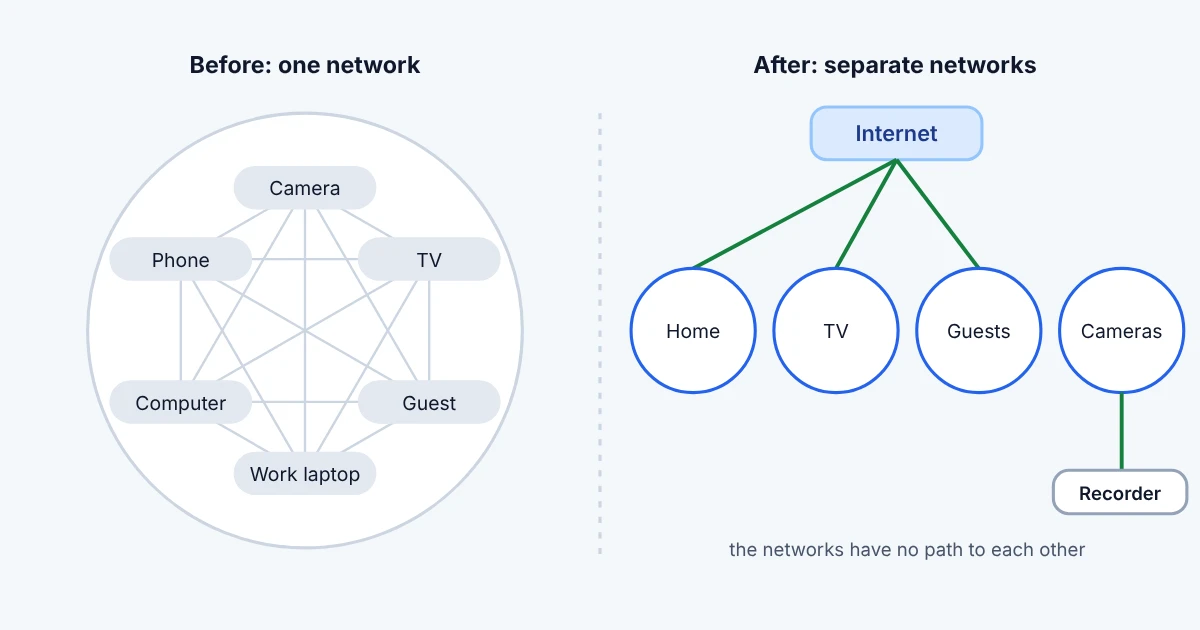
One network. The camera, the TV, the guests' phones and the work laptop are all on it. Each of these devices can see every other one.
The camera runs firmware from years ago and nobody updates it. If someone gets into it, the next stop is the laptop you work on.
The router has a rule that lets connections from the internet through to one machine inside. That machine is long gone.
Its address was given to another device. For years the door from the internet led there and nobody knew.
In both cases nobody made a mistake on purpose. Nobody looked again, that is all. The fix is not complicated either, if it is done in order.
What both cases have in common is that from the outside everything looks fine. The internet works, the camera records, the server answers. Nobody has a reason to open the settings. The problem only shows when something happens, and by then it is too late to tell where it came in.
The idea is simple: devices that have nothing to do with each other should not see each other. Each group gets its own network, its own Wi-Fi and its own rule for what it may do.
Computers, personal things, work. Everything you want to protect is here.
They record to the recorder. They have no path to the computers and no way out to the internet.
Internet only. The TV has no need to see your laptop.
Internet only. Guests see nothing of yours: not the printer, not the cameras, not the computers.
If you work from home, the work laptop is kept apart from the home network. If something happens to one, the other is not affected.
How can you tell whether your network is a single one? If your phone can see the printer, the TV and the camera, and so can a guest who got the Wi-Fi password, then everything is together. Most homes are exactly like this, because the provider's router comes set up that way.
This does not require replacing any device. The old network stays as it is. The new networks are added alongside it and devices are moved into them one at a time. If something does not work, it goes back to the old network until it is sorted out.
A guest network is the easiest step and the one that gives the most. Guests get a password for a separate Wi-Fi. They have internet and that is it. Their phone, whatever it may be infected with, cannot reach your devices.
The guest password can be changed at any time without touching anything else. Your devices stay on their own network and are not affected. If a guest needs to print, the printer is allowed explicitly, and only the printer.
Cameras are the riskiest devices in a home. They run day and night, are rarely updated and often have built-in access from the internet that the owner does not know about.
On their own network a camera can do one thing: write to the recorder. There is no path to the internet and none to the computers. You watch recordings through the recorder, not through the camera itself.
If you want to watch the cameras from your phone when you are away, that is done through a secure connection to your home (VPN). The camera is never visible from the internet, and you still have access to it from anywhere.
Anything that is not explicitly allowed is refused. From outside, the router shows nothing anyone could try.
In the office the logic is the same, but protection works on several levels. If one misses, the next one catches it.
The second case from the start, the rule pointing to a machine that no longer exists, is caught by the recorded history. When every rule is recorded with a reason and a date, it is easy to see which one no longer makes sense. Without a record it stays until someone stumbles on it by chance.
Nothing is changed all at once and nothing stops during working hours.
A camera that goes out to the internet on its own is a door into your home. Splitting the network costs one afternoon.
A rule that outlives its machine is an open door nobody remembers. A recorded history makes it visible.
An alert that comes a hundred times a day is never read. An alert that comes once and matters is read.
you have one laptop and the provider's router. There it is enough for the router to be updated and to have a good password.
Network Technology does this for homes and companies of any size, from the review to the final description.
Measured by an access test from each network to the others
How: we split the network and write a rule for each group
Measured by an outside check of the router before and after
How: we close everything that is not explicitly needed
Measured by a list of networks and rules that stays with you
How: we record every change with a reason and a date
Not always. Most modern routers support separate networks. If yours cannot, we will tell you what is needed during the review.
No. The new networks are added next to the old one and devices are moved one at a time.
For a home, usually one afternoon. For an office it depends on the devices and services and is agreed after the review.
Yes, through a secure connection to your home (VPN). The camera stays invisible from the internet.
Separate networks, a rule for each of them and a description of what is where and how every change is undone.
If you recognised one of the two cases, start with a review. You will see what you have, what is visible from outside and what is missing.

Head of IT Infrastructure & Security at Network Technology.